
Introduction
All the cables that connect the storage devices are SATA, PATA and SAS cables but these vary widely in terms of speed, signal design and performance. These differences will enable you to select the appropriate solution to your system of building or enterprise. Being a hardware engineer, having been working more than 10 years in Dongguan Kingda Electronic Technology Co., Ltd, where we have already produced millions of cables high-speed, starting with SATA and up to MCIO PCIe Gen5, I have observed how the wrong cable can transform a solid PC into a bottleneck or a server rack into a nightmare to maintain. The IDE ribbons of the 90s were cumbersome, but the current generation of enterprise SAS backbones resolved the old issues and introduced new ones.
The differences between SATA and PATA and SATA and SAS are broken down into this article with a chronological account of their development then going into the performance, compatibility and practical applications of these tools. You are upgrading a gaming computer, assembling a NAS, or even wiring a data center, you will be provided with clear information about the difference in data cabling to make a better decision. We shall begin with the large and scale down to what you need to be set up.
The Evolution of Data Cabling Standards
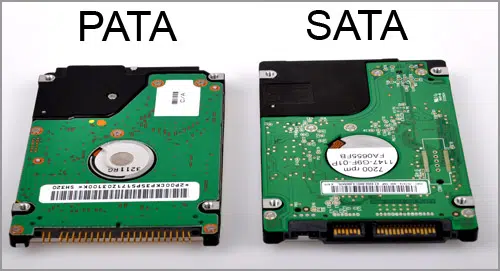
They are somewhat more advanced than the floppy disk and parallel port storage interfaces of the past. It began with PATA (Parallel ATA) in the mid-1980s, where the wide ribbon cables were used to transmit many bits at the same time, i.e. imagine highway but with very many lanes but so much traffic jam due to interference. By early 2000s this was reduced to single-lane stream transmission via SATA (Serial ATA) which doubled speeds and made cabling less complicated.
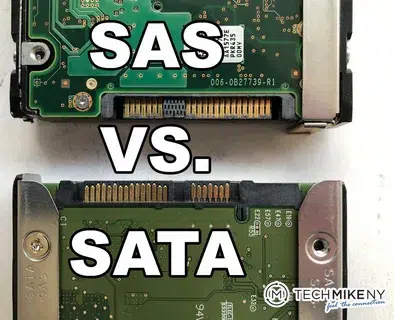
Then we had SAS ( Serial Attached SCSI ) which came around 2004, which is based on serial foundation of SATA, but with enterprise features such as dual port redundancy, and multiple drive option on servers. The switch to parallel over serial interface data cabling represents the transformation between consumer-desktops to enormous data centers. PATA has become a distant memory, and SATA has dominated consumer markets and SAS has ruled 80 per cent of enterprise storage at Kingda as per the 2024 reports of IDC. All the steps in the PATA SATA SAS history were solutions to actual constraints, speed, density, reliability, and combine to create hybrid setups of today.
SATA vs PATA — From Flat Ribbons to Streamlined Serial Cables
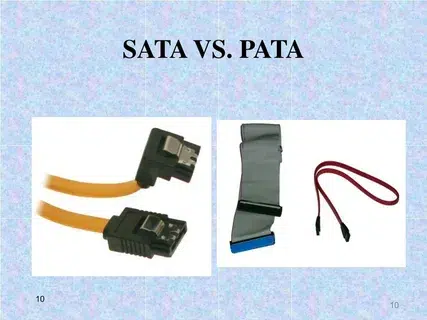
The showdown between SATA and PATA cable is a battle between a 1990s minivan and a sports car of today- they will get you there but one will get you there faster and with less trouble.
1. Cable Design & Connector Type
PATA required 40- or 80-wire ribbon cables with 40-pin connectors–wide and flat and stuffing airflow and weighing down cases. SATA? A slender 7-pin data cable with L-shaped connectors and a latch lock to ensure that it fits in. Imagine PATA and the sprawling strands of Christmas lights; SATA and the lengthy rope of a single strand.
2. Data Transfer Speed
The breakdown of SATA vs PATA speed is as follows:
| Interface | Max Transfer Rate | Year Introduced | Real-World Use |
| PATA (ATA/133) | 133 MB/s | 2002 | Legacy IDE drives |
| SATA I | 150 MB/s | 2003 | Early SATA HDDs |
| SATA II | 300 MB/s | 2004 | Mid-range systems |
| SATA III | 600 MB/s | 2009 | Modern SSDs/servers |
SATA increased throughput three times and reduced footprint- I have dislodged PATA cables in my former servers and wondered how SATA made it all easy.
3. Signal & Transmission
The parallel signaling of PATA introduced crosstalk -bits cross-pollinated between each other. The serial design of SATA transmits bits on a coding one at a time to allow longer runs (up to 1m) and neater signals. The design of SATA cables has removed the heat traps of ribbon cables which cooked components.
4. Power & Connector Simplicity
PATA required individual 4-pin Molex power; SATA had to integrate it into a 15-pin connector. This type of evolution of SATA connector allowed one to build foolproof and never again have an adapter that is mismatched.
5. Use Case Summary
They live on PATA in antique restorations; on SATA in PCs and NAS consumer markets. And, in the case of IDE cable replacement, SATA is the upgrade of choice.
SATA vs SAS — Consumer vs Enterprise-Class Connectivity
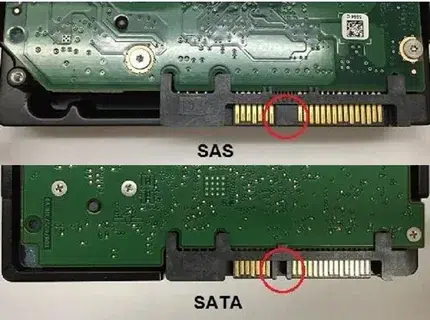
SATA vs SAS cable is now the workerhorse of the consumer that is in conflict with the enterprise giant. Serial but with professional muscle added by SAS.
1. Overview of Both Interfaces
SATA: Low priced, one-port desktop, and notebook SATA. SAS: Server expandable, Dual port, think redundancy on failure of a path.
2. Cable and Connector Design
| Feature | SATA | SAS |
| Data Pins | 7 | 29 (combined data + control) |
| Connector Type | L-shaped 7-pin | Multi-pin with latch |
| Cable Length | Up to 1m | Up to 10m |
| Compatibility | SATA drives only | SAS + SATA drives |
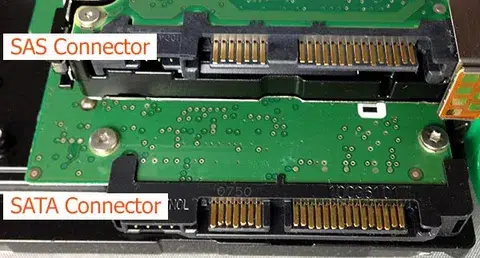
SAS connector vs SATA shows the enterprise focus—bulkier but more robust. SAS cable construction uses twinax for shielding.
3. Data Speed and Performance
SATA III hits 6 Gb/s per channel. SAS 3.0 is two times high (12 Gb/s per lane) to multi-lane able(48 Gb/s). SAS vs SATA performance is more impressive in full-duplex mode i.e. SAS sends/receives at the same time whereas SATA sends and receives alternating.
4. Reliability and Signal Integrity
SAS has CRC error correction and enhanced SAS cable shielding, which is ideal in RAID where a single error propagates. SAS cables are a guarantee of redundancy and speed in enterprise RAID arrays, and I have personally encountered SATA having difficulties in full-time use.
5. Typical Use Cases
SATA on consumer PCs, gaming computers, NAS. SAS to data centres, apps of mission critical.
Physical and Electrical Differences at a Glance
Your PATA/SATA/SAS comparison graph:
| Feature | PATA | SATA | SAS |
| Transmission Type | Parallel | Serial | Serial |
| Max Data Rate | 133 MB/s | 600 MB/s | 12 Gb/s |
| Cable Length | 0.45m | 1m | 10m |
| Connector Pins | 40-pin | 7-pin | 29-pin |
| Cable Design | Flat ribbon | Slim single line | Shielded twinax |
| Compatibility | Legacy only | Consumer-grade | Enterprise + SATA |
SATA connector comparison shows the clear progression.
Signal Integrity and Shielding Considerations
Serial transmission raised the level of EMI resistance considerably. The straight parallel lines in PATA were a source of noise; the rudimentary shielding of SATA with PCs. Industrial noise SAS cable shielding Multi-layer foil/braid SAS cable signal integrity cuts crosstalk by 40% more than SATA.
The high-speed stability depends on impedance control (~85 2 differential). SAS vs SATA EMI resistance SAS: SAS is preferred in the data centres.
Backward Compatibility and Upgrade Paths
Working with SATA II/I drives (auto-negotiation). SATA drives are compatible with SAS controllers to provide flexibility of configurations- SAS support SATA is a massive success in migrations. PATA? Needs infrequent accommodators, and does not pay.
Choosing the Right Interface for Your System
| Environment | Recommended Interface | Reason |
| Gaming PC | SATA III | Affordable and fast |
| NAS Server | SATA/SAS hybrid | Flexible scaling |
| Data Center | SAS 3.0 | High reliability |
| Legacy Machine | PATA | Compatibility only |
Select SATA or SAS according to requirements–application defined best interface to store.
Why Understanding Cabling Still Matters Today
NVMe/ PCIe has not replaced SATA backplanes and SAS. Performance, airflow and durability are secured by proper selection. At Kingda, we have SATA SAS OEM manufacturer skills with respect to professional integration.
Conclusion — Choosing the Right Cable for the Right Job
PATA, SATA or SAS have their role in the history and current infrastructure of computing. Knowing their differences would guarantee the optimum combination of performance, reliability, and cost.
Require some bespoke SATA or SAS cable assemblies? Get in touch with Dongguan Kingda Electronic Technology Co., Ltd to have solutions of high-performance OEM cable.