Author name: Wang Palle

As the third employee of Dongguan Kingda Electronic Technology Co.,Ltd, Palle Wang has grown together with the company since its early days. She currently serves as Blog Editor, where she oversees the creation and publication of technical content related to high-speed transmission cables, including MCIO PCIe Gen5, SAS, OCuLink, QSFP/SFP, and USB4 solutions. With a strong background in technical writing and digital content management, she ensures that Kingda’s blog not only reflects the company’s engineering expertise but also provides valuable insights to global customers, engineers, and partners. Her work contributes to Kingda’s mission of building trust, authority, and transparency in the high-speed cable industry.

Wang Palle
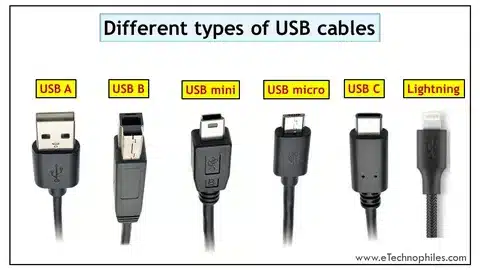
“Image showing USB cable types: Type-A, Type-B, Mini-USB, Micro-USB, Type-C, and Lightning.”
Uncategorized

Complete Guide to USB Cable Types: Everything You Need to Know

The article “Complete Guide to USB Cable Types: Everything You Need to Know” provides a comprehensive overview of the different USB cables, their designs, and their uses. It explains the evolution from older standards like USB-A and USB-B to compact versions such as Mini-USB and Micro-USB, and finally to the modern USB-C, which supports high-speed data transfer, fast charging, and even video output. The guide also covers how different USB versions—from USB 1.0 up to USB4—affect speed and compatibility, and it emphasizes the importance of choosing the right cable based on your device, charging needs, and data requirements. By understanding the distinctions between cable types, users can make better choices for powering devices, transferring files, or connecting peripherals, while also preparing for the universal adoption of USB-C as the future standard.

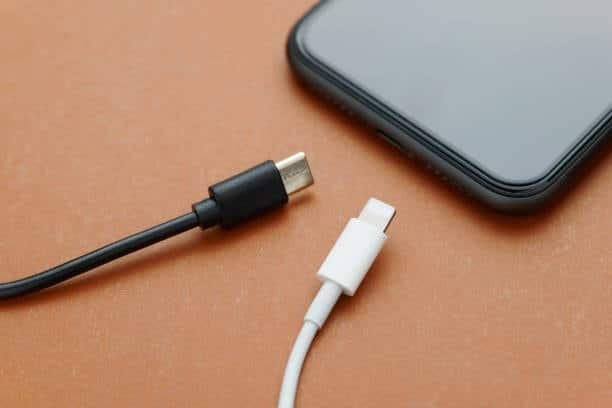
Black usb c cable and white lightning cable with smartphone
Uncategorized

Lightning Port vs USB-C: Which Charging Standard Wins?

The Lightning port, introduced in 2012 by Apple was a revolutionary concept to the time – having a compact, reversible 8-pin connector, that allowed users to simply connect their devices without having to fumble around into the right direction and a very fluent list of additional Apple based accessories to include in their ecosystem such as their iPhones, iPads, AirPods, and keyboard products. It also worked reliably and safely for more than ten years but was prone to limitations: limited capabilities of the data transfer up to 480 Mbps, a top charging power of only 20W, and the exclusivity with Apple devices only, as well as the increased cable price because of the MFi certification program. In the meantime, USB-C, a new technology introduced in 2014, is meant to unite all charging methods across devices and brands, providing fast charging up to 240W with USB Power Delivery 3.1, super high-speed data transfer up to 40 Gbps with Thunderbolt 4, and support of the video output on 4K and 8K displays, thus, becoming a universal solution to use in smartphones, laptops, tablets, gaming consoles, etc. Although USB-C cables may vary in quality, support not all features, and may be of lesser quality than Lightning, which is device-specific, the technology is open, making it often more cost effective and capable of a greater variety of purposes. In accordance with world standards such as the European Union, USB-C is implemented, with usability to occur in the year 2023, Apple began to switch to USB-C on iPhone devices, a major change to the single charging standard. The change is advantageous to consumers as it allows a single cable to serve many devices, quicker charging and data transfer adjust to the fact that it will lessen the amount of e-waste, and cheaper over the long-term. However, the adapters on currently existing Lightning accessories will need adapters. Overall, although Lightning is an important part of the history of Apple products and is still convenient to those who are deeply entrenched in the Apple ecosystem, USB-C clearly offers better performance, compatibility, and long-term use, and as it seems Apple will stop using Lightning as well, the era of proprietary charging ports is behind us, and any person that upgrades or seeks a simplified and high-speed and future-proof charging must switch to USB-C.


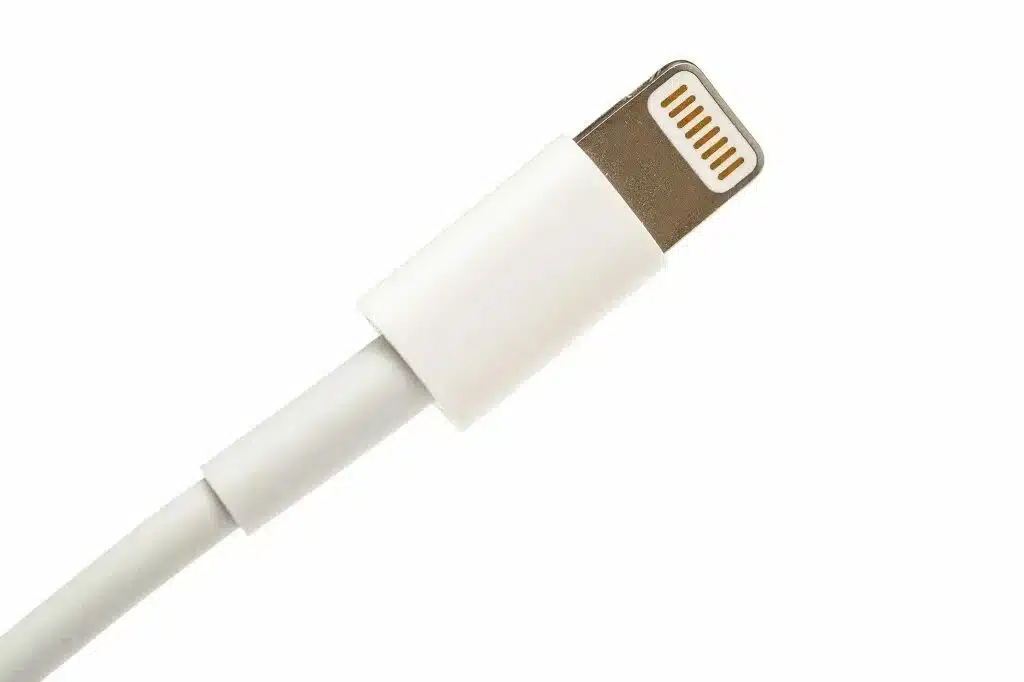
“Apple Lightning connector cable with durable white design for iPhone and iPad.”
Uncategorized

What Is Lightning USB Cable: Complete Guide

The article “What Is Lightning USB Cable: Complete Guide” explains Apple’s proprietary Lightning cable, its features, and its role in connecting and charging devices. Introduced in 2012, the Lightning connector replaced the older 30-pin dock, offering a smaller, reversible design that makes it easy to plug in either way. The guide highlights its ability to handle charging, audio, and data transfer, while being exclusive to Apple devices like iPhones, iPads, and certain accessories. It also compares Lightning to newer standards like USB-C, noting that while Lightning is reliable and widely supported in the Apple ecosystem, it is slower and less versatile than USB-C, which supports faster speeds and universal compatibility. Overall, the article shows that Lightning cables remain essential for many Apple users, but the industry is steadily moving toward USB-C as the future standard.

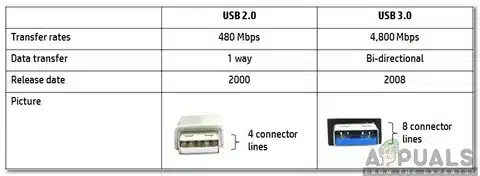
“Comparison table showing USB 2.0 and USB 3.0 features including transfer rate, data transfer, release date, and connector lines.”
Uncategorized

What is USB 2.0 vs USB 3.0: Complete Speed & Performance Guide

USB 3.0 has strong benefits among those who often move big files, or external storage as well as future-proofing their systems. The ten-fold speed improvement and enhanced power delivery justify the modest cost increase for most applications.

Nevertheless, USB 2.0 is still an option with simple peripherals and low end users whose programs do not need high-speed data transfer. Knowing your particular requirements, will help you to understand the appropriate technology to use without overspending.

Do you feel that there is a big difference in speed between USB 2.0 and 3.0 in your everyday activities? Become better informed and make better decisions about your connectivity habits by sharing your experiences and assisting other readers.

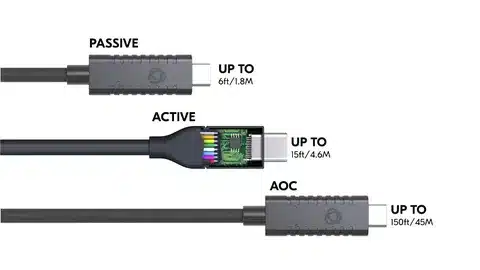
Diagram comparing USB passive cable length up to 6ft, active USB cable up to 15ft, and optical USB cable up to 150ft.
Uncategorized

USB Cable Length Limits: A Complete Guide

The guide “USB Cable Length Limits: A Complete Guide” discusses how cable length would directly affect charging speed, data transfer performance, and device reliability, along with maximum supported lengths for each USB version: 3 meters for USB 1.x and 5 meters for USB 2.0 to as little as 0.8-3 meters for high-speed USB 3.x, USB4, and Thunderbolt. Such specifications arise primarily due to degradation of the signal, timing limitations, and adherence to compliance standards designed to ensure interoperability between the devices. To initiate some of these extensions, the guide offers practical and proven approaches such as the use of active repeater cables, self-powered hubs, hub chains, USB-over-Ethernet adapters, or even fiber optic methods for industrial applications. Best practices, like investing in a good and certified cable, following the hub tier rule, and taking into account environmental factors, are highlighted in order to create and maintain a stable long-distance connection. In the end, it will be possible for users to extend USB usage into anything from the home office to large-scale industrial using the right tools and techniques.

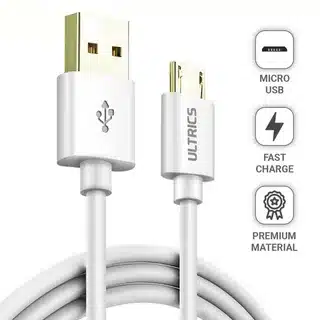
Micro USB charging cable for fast charging and premium durability.
Uncategorized

USB Data Cable vs USB Charging Cable: Know the Difference

The article “USB Data Cable vs USB Charging Cable: Know the Difference” explains the key distinction between cables designed for data transfer and those made solely for charging. A USB data cable contains both power wires and data lines, allowing it to charge devices while also transferring files such as photos, music, or documents between devices. In contrast, a USB charging cable only carries power, making it lighter and often cheaper, but unable to sync or move data. The guide highlights how to identify each type by labeling, connectors, or testing, and stresses the importance of choosing the right cable based on your needs—whether it’s fast charging, reliable data transfer, or both. Ultimately, knowing this difference helps avoid frustration, ensures proper performance, and prevents wasting money on the wrong cable.

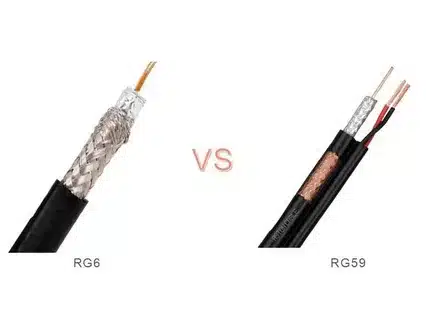
Comparison of RG6 and RG59 coaxial cables showing shielding, conductor size, and insulation thickness
Uncategorized

RG59 vs RG6: Which Coaxial Cable Should You Choose?

RG59 and RG6 are two common coaxial cables, each suited to different applications. RG59 has a thinner conductor (20–22 AWG), single shielding, and lower frequency capacity, making it flexible, affordable, and adequate for older CCTV or short-run analog video setups. However, it suffers higher signal loss and poor performance at high frequencies or over long distances. RG6, on the other hand, has a thicker conductor (18 AWG), stronger insulation, and dual (or even quad) shielding, which minimizes interference and supports high-frequency signals with low attenuation. This makes RG6 the modern standard for satellite TV, cable internet, HDTV, and long cable runs, despite being less flexible and more expensive than RG59. In general, RG59 may still be used for simple or legacy analog systems, but RG6 is the recommended choice for digital applications, better reliability, and future-proofing installations.

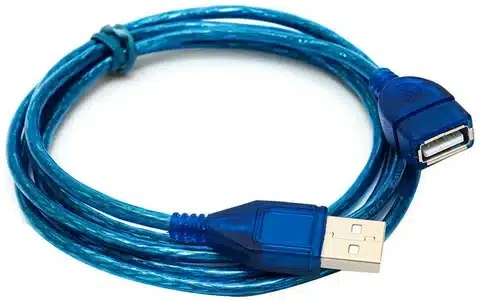
Close-up of a blue USB extension cable featuring male to female connectors, ideal for extending USB device range
Uncategorized

How to Extend USB Cable: A Complete Guide to Breaking Distance Barriers

Extending USB cables is essential when short cords cause clutter or limit device placement, but distance limits can affect performance. Passive USB extension cables are the simplest and cheapest option, suitable for short runs up to 16 feet, though they risk signal loss beyond that. For medium distances of 16–100 feet, active USB extension cables with built-in repeaters boost and maintain signal strength, making them ideal for setups like conference rooms, digital signage, or external drives. For the longest runs, up to 200 feet, USB-over-Ethernet extenders using Cat5/Cat6 cables provide reliable performance for applications such as surveillance systems and large facilities. Choosing the right solution depends on distance, device bandwidth needs, and power requirements—low-power devices like keyboards can use passive solutions, while high-bandwidth devices like 4K webcams or external SSDs need active or Ethernet-based extensions. With proper planning for power, bandwidth, and environment, users can overcome USB distance limits and ensure smooth, reliable connectivity.

Uncategorized

What Does a USB Type C Port Look Like?

A USB Type-C port is a small, oval-shaped connector that is slimmer and more compact than older USB types, making it easy to recognize. Unlike traditional USB-A plugs, it is reversible, meaning it can be inserted either way up without worrying about orientation. The port supports high-speed data transfer, fast charging, and multiple functions such as audio, video, and power delivery, often replacing HDMI, power, and older USB ports in modern devices. Its sleek, symmetrical design has made it the standard choice for smartphones, laptops, and tablets, offering both convenience and versatility in one universal connector.

Uncategorized

The Complete Guide The Type Of USB Connectors: Everything You Need to Know

The guide explains the different types of USB connectors, their designs, and their uses across various devices. It covers traditional types like USB-A and USB-B, compact versions such as Mini-USB and Micro-USB, and the modern USB-C standard that supports faster speeds, higher power delivery, and reversible plugs. The article highlights compatibility issues, typical applications (from keyboards and external drives to smartphones and chargers), and evolving standards from USB 2.0 to USB 3.x and beyond. By understanding these connector types, users can choose the right cables for charging, data transfer, and connectivity, while also preparing for future devices that increasingly adopt USB-C as the universal standard.

Uncategorized

Types of Video Cables: Identify the Right Connector at a Glance

The guide “Types of Video Cables: Identify the Right Connector at a Glance” explains the most common video cable types and their uses, helping readers quickly recognize the right connector for their devices. It covers older analog options like VGA and Composite, which are largely phased out, as well as digital standards such as DVI, HDMI, and DisplayPort. The article highlights HDMI as the universal choice for TVs, gaming consoles, and home theaters, while DisplayPort is preferred for high-resolution monitors and professional setups. It also mentions specialized cables like Mini HDMI, Micro HDMI, and USB-C with video output for modern laptops and smartphones. By understanding each cable’s shape, compatibility, and performance, users can easily identify the right video connector for applications ranging from basic displays to advanced 4K and 8K systems.

Uncategorized

iPad With USB-C: Complete Guide to Features and Compatibility

The article “iPad With USB-C: Complete Guide to Features and Compatibility” highlights Apple’s shift from Lightning to USB-C on iPads and what it means for users. It explains how USB-C provides faster charging, higher power delivery, and much quicker data transfer speeds, making it especially useful for professionals handling photos, videos, and large files. Beyond charging and syncing, USB-C also supports external accessories like displays, hubs, storage devices, and even audio interfaces, turning the iPad into a more versatile productivity tool. The guide compares compatibility across different iPad models, clarifies what features depend on cable and charger quality, and emphasizes how USB-C aligns iPads with the broader tech ecosystem where USB-C is becoming the universal standard. In short, the move to USB-C future-proofs the iPad, offering users more flexibility, speed, and functionality than ever before.

Scroll to Top

GET A QUOTE