
Why USB Technology Matters in Your Daily Digital Life
USB connections are the unseen limb of our digital ecosystem, serving as a crucial data connection in the present day globalized world. USB technology silently runs millions of daily interactions connecting our equipment, whether it is charging a smartphone or moving a giant video file universal serial bus.
Be it a content creator uploading gigabytes of footage, a professional saving essential data, or an everyday person who wants his or her devices to operate more quickly, knowing about the differences between USB 2.0 and USB 3.0 may radically enhance his or her experience with technology usb devices.
The Evolution That Changed Everything: From USB 2.0 to USB 3.0
USB 2.0 was introduced in 2000 and it transformed the device connection by its Hi-Speed. It was above a decade that it had been the standard of most consumer electronics, particularly in mass storage devices digital cameras. Nonetheless, an increase in file sizes and an increase in user demands made high speed data transmission more and more important usb specifications.
USB 3.0 enters the market in 2008 and its name is rebranded as the SuperSpeed USB usb c port. It was more than an upgrade; it was a total architectural reworking that promised to be ten times quicker and more energy efficient, enabling faster usb ports flash drives.
What Makes This Comparison Essential for Modern Users
The majority of the population believes that the usb standard is always better to have something newer, yet the situation is more complicated. USB 2.0 continues to serve millions of devices effectively, but the USB 3.0 is better in particular situations. Being aware of the moments each technology excels will help you save money and get the best out of your configuration hi speed usb.
This guide does more than just the technical specifications; it demonstrates the actual performance differences in the real world to allow you to make informed decision regarding usb cables, devices and upgrading wireless internet connections.
Technical Specifications: USB 2.0 vs USB 3.0 Breakdown
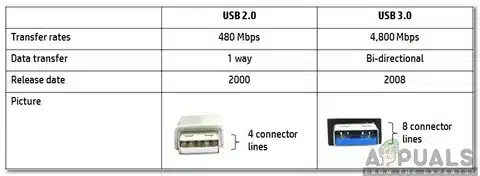
| Feature | USB 2.0 | USB 3.0 (“SuperSpeed”) |
| Year Released | 2000 | 2008 |
| Maximum Speed | 480 Mbps | 5 Gbps (10× faster) |
| Data Transfer Mode | Half-duplex | Full-duplex |
| Power Delivery | 500 mA (2.5W) | 900 mA (4.5W) |
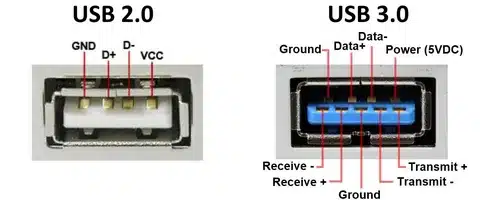
| Connector Pins | 4 | 9 |
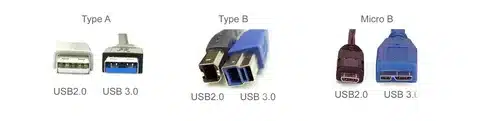
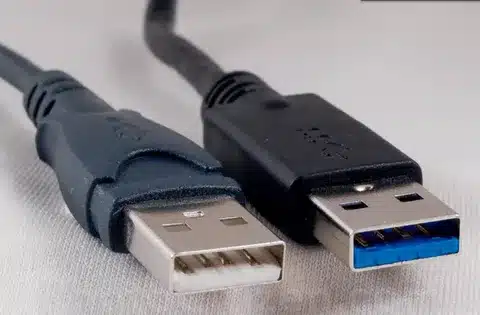
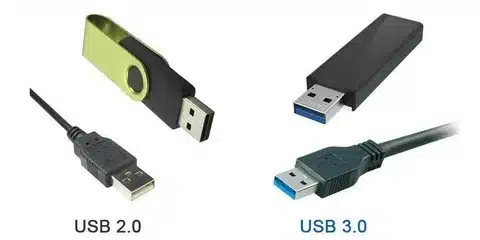
| Port Color | Black/White insert | Blue insert |
| Backward Compatibility | — | Fully compatible with USB 2.0 |
Understanding Data Transfer Speed Differences
The most significant difference between USB 2.0 and USB 3.0 lies in their maximum data transfer rate capabilities. USB 2.0 has a theoretical peak of 480 Mbps, which corresponds to the usb data transfer rates of about 60 MB/s under real world conditions, considering the protocol overhead and system overheads network adapters supply power.
USB 3.0’s 5 Gbps theoretical speed delivers approximately 400-500 MB/s in practical scenarios. This startling enhancement is due to some basic architectural evolutions, such as the extra data channels and enhanced signal processing usb interface.
Half-Duplex vs Full-Duplex: Why It Matters
USB 2.0 is half-duplex, that is, only one direction at a time. When you are copying a file to an external drive you will see that the communication alternates between transmitting data and getting confirmation signals usb type.
The full-duplex nature of USB 3.0 supports two-way path of data at the same time. This implies that your usb connector system is capable of transmitting and receiving data at the same time and is much more efficient when performing a complicated task, such as synchronization or file backup.
Power Delivery Improvements in USB 3.0
In addition to speed, USB 3.0 offers almost twice the amount of usb power delivery as compared to the USB 2.0. This higher power delivery (4.5W versus 2.5 W) allows more demanding devices to be supported without the need of individual power adapters usb c cable.
The increased power performance is especially useful with external hard drives, portable SSDs, and devices that require being charged as they transfer data. USB 3.0 devices can be engineered in many cases to be efficient not needing external power supply which the USB 2.0 versions would need.
Visual Identification: Spotting USB 3.0 Ports and Cables
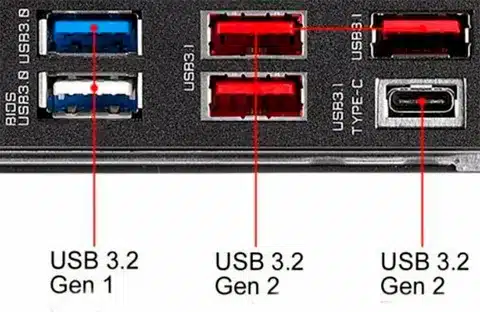
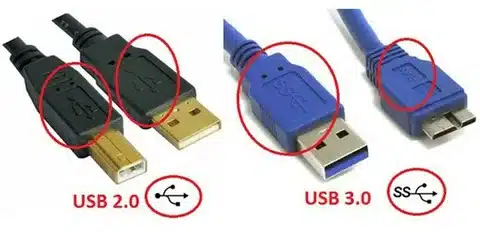
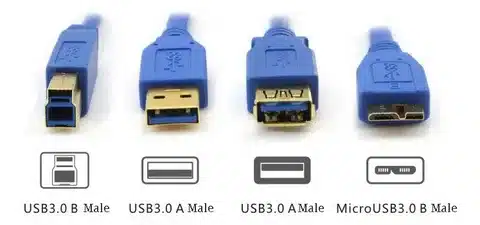
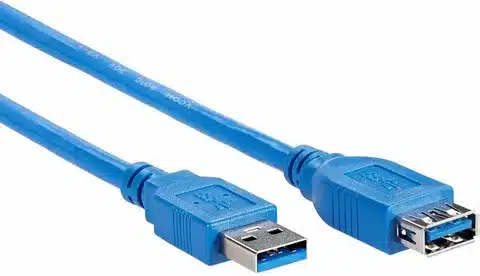
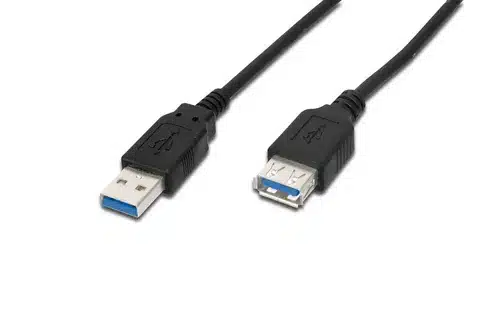
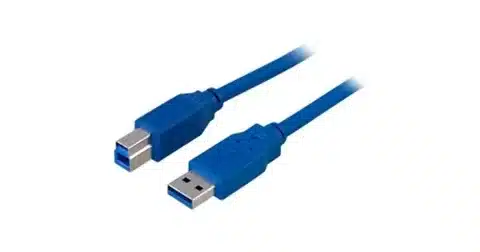
USB 3.0 ports are usually plasticized blue in color, and thus can easily be recognized compared to black or white USB 2.0 ports. Nevertheless, other manufacturers have different usb connector types and color combinations, and thus verification of device specifications is of importance.
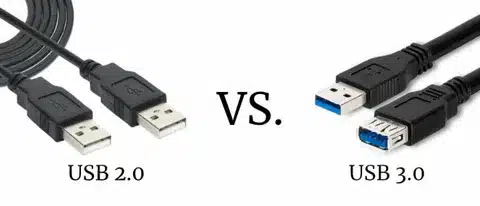
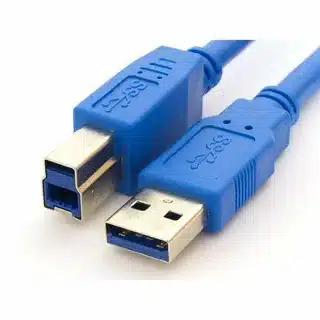
USB 3.0 cables have extra wires in order to provide faster speeds and deliver more power. Such cables are usually a little bigger than the USB 2.0 counterparts and have the unique SuperSpeed USB mark.
When USB 2.0 Is Perfectly Adequate
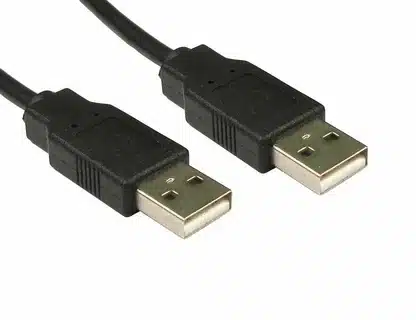
USB 2.0 is the perfect technology although older technology, to use in many applications. Simple webcams, keyboards, and mice, etc. can work well with USB 2.0 speeds because they use low bandwidth.
Most printers, scanners, and simple audio interfaces, as well as other typical office peripherals, hardly need the extra bandwidth that USB 3.0 can offer. For these applications, USB 2.0 offers reliable performance at lower costs.
Devices That Benefit Most from USB 3.0
External solid-state drives (SSDs) are the most dramatic displays of the benefits of USB 3.0. Although mechanical limitations can prevent traditional hard drives from using all the bandwidth of USB 3.0, SSDs can be used to nearly reach the theoretical rates of the interface.
USB 3.0 bandwidth is needed by high-resolution webcams, especially ones that support 4K video, to support smooth and uncompressed video delivery. Likewise, many professional audio interfaces using multiple inputs/outputs require USB 3.0 to perform with low-latency.
Gaming and VR Applications: Where Speed Matters
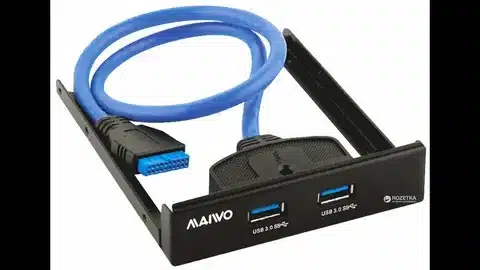
USB 3.0 has a beneficial effect on modern gaming peripherals, notably those that have a high polling rate and use an LED lighting system, which needs increased data throughput and power delivery capabilities.
Perhaps the most challenging USB application, virtual reality headsets need continuous, high bandwidth data streams to track sensors, display streams, and to perform audio processing. USB 2.0 can simply not deliver the bandwidth needed to grant top VR experiences in portable electronics .
File Transfer Speed Comparison: Real-World Examples
Assume the case of transferring a 16 GB movie file which is not an extraordinary case among many users. This transfer normally requires 4-6 minutes under the USB 2.0. The same file transfers in approximately 45-60 seconds via USB 3.0.
The time difference is even more notable when it comes to bigger transfers, e.g. when you are trying to back up a 500 GB picture library. USB 2.0 may take several hours whereas USB 3.0 may take within 30 to 45 minutes.
Professional Workflows: Content Creation Impact
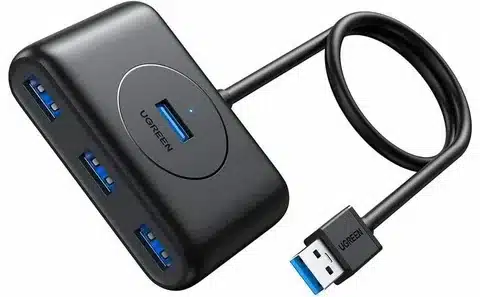
USB 3.0 offers the most dramatic advantages to creators of content using 4K video files or RAW photography. One minute of 4K video may use 1-2 GB of storage space and so fast data transfer rates are necessary to support effective work processes.
Professional photographers in the RAW format usually work with 50-100 MB. USB 3.0 can save the time of waiting during the processing of hundreds of images of the same session.
USB 3.0 Compatibility with USB 2.0 Devices
USB 3.0 is fully backwards compatible with USB 2.0 devices which is one of its largest advantages. Any USB 2.0 device, including low power devices, can plug into a USB 3.0 port without problems but at USB 2.0 rates.
This is a good match so that upgrading to USB 3.0 does not make the old peripherals obsolete. To attain USB 3.0 however, the port and the attached device should be compliant with the standard.
Cable Length Limitations and Solutions
USB 2.0 has the ability to sustain credible connections up to 5 meters (16 feet) without much loss of signal. This renders it useful in applications where longer cable run is needed like room to room device connections.
At the higher frequencies of USB 3.0 it becomes more prone to signal loss, so reliable passive cable lengths are limited to about 3 meters (10 feet). Further than that, active cables or powered hubs will be required to ensure that the signal remains intact.
Signal Quality Considerations for Long Runs
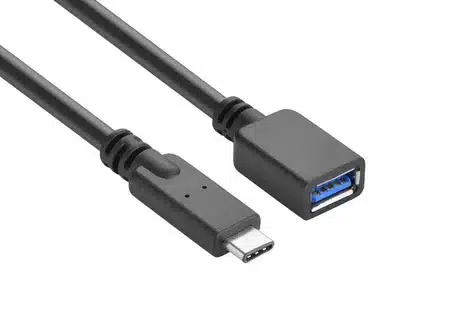
USB 3.0 uses higher data rates, which makes it more vulnerable to electromagnetic interference and cable quality. Low-quality USB 3.0 cables can suffer drops in connection or reduce the connection speed that USB 2.0 connections would not have.
To achieve installations with long cable runs, powered USB hubs may be considered or active extension cables specifically matched to USB 3.0. These solutions have a high signal strength and reliability even at a long distance.
Powered Hubs and Signal Repeaters
In applications where USB 3.0 connections need to be extended past normal cable distances, powered hubs can be used in two ways; firstly, to boost the signal to reach out farther, and secondly, to add power to a tangled device.
The active USB extension cables have inherent signal amplifications, enabling dependable USB 3.0 links to a maximum distance of 15-20 meters. These dedicated cables are more expensive than passive cable but they guarantee reliability.
Power Management Differences
USB 3.0 adds more advanced features of power management which enable devices to proceed to different sleep modes when not actively exchanging information. This feature decreases the total power usage and heat.
The improved power states in USB 3.0 enable better battery life for laptops and more efficient operation of portable devices. USB 3.0 devices can be connected in a way that optimum power levels are negotiated according to the current needs of devices.
Charging Capabilities and Power Delivery
Although both USB 2.0 and USB 3.0 do not conform to contemporary fast-charging standards, USB 3.0 has higher power output that can refill devices faster than USB 2.0. It is specifically prominent when it comes to tablets and bigger smartphones.
Certain USB 3.0 implementations can provide more power delivery modes, allowing them to charge laptops and other power intensive devices. Nevertheless, specialized charging standards such as USB-C Power Delivery have better charging capability.
Energy Efficiency in USB 3.0
USB 3.0 is more energy efficient than USB 2.0 even though it provides more power when required. The sophisticated power control enables the devices to use minimum power when they are not active in transferring data.
The gain in this efficiency is more apparent in enterprise setup with very many connected devices and may decrease the total power usage and operational expenses.
USB 3.1 and USB 3.2: The Next Evolution
USB 3.1 released in 2013 doubled the speed of USB 3.0 to 10 Gbps without introducing new hardware or software, by being backward-compatible. Such a standard as SuperSpeed+ is the response to the increasing bandwidth needs of contemporary storage devices and high resolution displays.
USB 3.2, which was released in 2017, uses many data lanes to further boost speeds to 20 Gbps. These maximum speeds, however, demand particular types of cable and connector, which complicates the ecosystem.
USB4: The Future of Connectivity
The next significant USB technology is one called USB4, which is a Thunderhead 3-based standard. USB4 will standardize other connection standards with speed up to 40 Gbps and enhanced device compatibility.
Although these have been developed, USB 3.0 is still applicable and cost-effective to the majority of the consumer applications. The new standards have performance gains that tend to be higher than typical user needs, especially when considering the capabilities of the host computer so USB 3.0 is the sweet spot on many applications.
Why USB 3.0 Remains Relevant Today
Even with newer standards available, USB 3.0 strikes an ideal balance between performance and cost. It is widely adopted, thus, compatible devices and cables are easily found at fair prices.
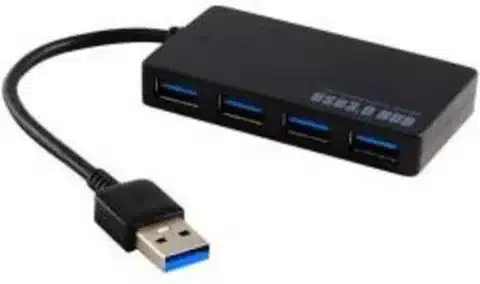
USB 3.0 is an adequate bandwidth in the current and near future needs of most users. USB 3.0 provides very high performance without the high price of state-of-the-art alternatives unless you have very large files to work with, or and/or specialized professional devices.
Device Compatibility Assessment
Evaluate your particular device needs before buying new cables or hubs. Take a look at ports available on your computer, and make a note of which of them support USB 3.0 and which ones support only USB 2.0.
Check your peripheral devices to see which would make decent use of USB 3.0. USB 3.0 connectivity has been most often seen to dramatically improve external storage devices, high-resolution cameras, and professional audio equipment.
Storage Device Recommendations
In external storage, solid-state drives with USB 3.0 connection have the optimal balance of performance. Old fashioned hard drives might not be able to utilize the full bandwidth of USB 3.0, yet they enjoy better delivery of power and future-proofing.
Choose external storage bearing in mind the present and future requirements. Although your existing workload may not need USB 3.0 yet, there is a chance that in the future you will find that your applications can use the extra bandwidth.
Cable Quality and Selection Guide
USB 3.0 cables are not all manufactured the same. Good cables are well shielded and built to ensure the signal quality and desired speeds are attained. Inexpensive cables could have connection problems, or slow transfer speeds.
Search official standards Look in cables that have been certified by the USB Implementers Forum (USB-IF). These certified cables are highly tested so that the performance and compatibility may be checked.
Budget Considerations and Cost Analysis
USB 3.0 cables and devices are normally priced 10-30 percent higher than their USB 2.0 counterparts. Nevertheless, this small price premium tends to deliver impressive long-run value in a number of enhanced performance and compatibility in the future.
Make purchasing decisions with regards to the overall cost of ownership. A USB 3.0 solution a little more costly can prevent the necessity of upgrading the solution in the future and give superior performance over its lifespan.
Troubleshooting Slow Transfer Speeds
When you find yourself transfer speeds that are slower than you would expect, the first thing to do is to ensure that your two gadgets are USB 3.0. Any device that has a USB 2.0 connection will be limited to USB 2.0 performance, which is managed by the host controller, even in a USB 3.0 connection.
You should verify the quality and length of your cables. USB 3.0 performance can be seriously affected by excessively long cables, or by insufficient quality connectors. Attempt with a shorter and quality cable to immerse the trouble.
Connection and Detection Issues
Driver issues are a frequent cause of device detection issues and not hardware issues. Always make sure your operating system contains up to date USB 3.0 drivers, especially in older computers that had USB 3.0 support provided by expansion cards.
Detection problems may also be related to power. USB 3.0 devices that are power intensive might not work well when unplugged in to unplugged hubs or when your computer USB power management is set to a more aggressive mode.
Charging Speed Problems
USB connections that charge slowly often reflect the inadequate supply of power and not restrictions in data transfer. Ensure that your USB port can deliver the power demands of your device and that you have got an acceptable cable.
Certain appliances need special charging procedures that might not be compatible with the common usb c connector USB 3.0 outlets. Specific charging ports or adapters can be needed in these situations that are designed to fit your particular device.
Performance Optimization Tips
When you can, connect high-bandwidth devices via the built-in USB 3.0 ports of your computer instead of using a hub to maximize the performance of your USB 3.0 connections. This guarantees the device full bandwidth utilization and peak power supply.
Ensure that your USB 3.0 drivers are current and you may also want to change the power management options so that USB ports do not go into aggressive power-saving mode which may affect performance.
Making the Right Choice for Your Needs
USB 2.0 or USB 3.0 is a choice that still rests with your particular uses and performance needs. USB 2.0 is quite suitable and cost-effective in the case of simple peripherals and low-end configurations.
USB 3.0 is appropriate in cases when dealing with storage devices that work fast, moving large files frequently, or future-proofing the configuration according to the changing technology requirements of the usb standard . The large performance increases usually are well worth the modest cost premium.
Future-Proofing Your Setup
The world of technology changes fast and the new high-tech machines of today can become the standard machinery of tomorrow. USB 3.0 infrastructure is an investment that would allow future hardware and software to operate at a higher bandwidth.
Take into consideration your upgrade schedule when buying. Assuming that you intend to keep things as they are over a few years, you can avoid expensive upgrades by picking USB 3.0 now.