SATA Data Cable vs SATA Power Cable: Understanding the Two Roles
Introduction Both SATA data and power cables are essential for connecting modern storage devices—one transmits data, the other delivers power. […]

Introduction Both SATA data and power cables are essential for connecting modern storage devices—one transmits data, the other delivers power. […]
Introduction Not all SATA cables are the same – the right SATA cable can enhance system stability, improve speed, and
Introduction Standard SATA cable is used with the basic PC construction, however, custom OEM SATA cable assemblies are better fitting,
Introduction: Decoding Storage Cable Choices in 2025 The SATA vs. NVMe cable controversy has never been as heated as it
Introduction: Navigating AI Demands in Data Centers The emerging trend of artificial intelligence (AI) increasing rapidly in 2025 has put
With the unprecedented demands on data centres in 2025 due to AI, cloud computing and big data, the SATA cables have become not just connectors but now performance essentials. This is a comprehensive guide to the newest high-performance SATA cable technologies, the main selection considerations, and the best practices in the industry that can enable you to achieve the best storage performance, minimize latency, and assure consistent connectivity in today’s data center conditions.

As liquid cooling transforms data centers in 2025, durable SATA cables are essential for reliability. Since 2012, Kingda Electronic has led in high-speed cable design, offering this guide to enhance SATA cable durability for liquid-cooled setups, minimizing downtime and maximizing performance.
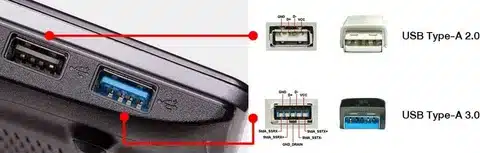
Identifying what type of USB port you have is key to knowing your device’s charging, data transfer, and connectivity capabilities. Common types include USB-A, the classic rectangular port; USB-B, often found on printers and older peripherals; micro-USB and mini-USB, used in many older phones and gadgets; and the newer USB-C, a smaller, reversible connector that supports faster speeds, higher power delivery, and multiple functions like video output. Beyond the shape, you also need to check the USB version (such as USB 2.0, 3.0, 3.1, or 3.2), since that determines data rates and power limits. In short, recognizing both the connector shape and the supported protocol helps you choose the right cables and accessories for your device.
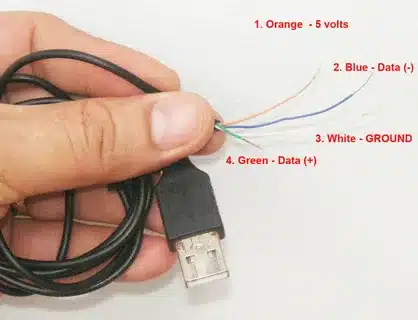
A USB cable typically contains four main wires—two for power (positive and ground) and two for data (D+ and D–)—but the exact number can vary depending on the cable’s purpose and version. Basic charging cables may only include the power pair, while more advanced USB 3.x or USB-C cables can have additional wires and shielded pairs to support higher data speeds, power delivery up to 100W, and functions like video output. The wiring also includes shielding to reduce interference and maintain stable connections. In short, the number of wires in a USB cable depends on whether it’s built just for charging or for full power, data, and multimedia transmission.
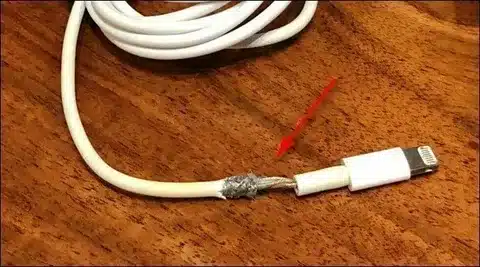
When an iPhone charger wire stops working, it’s usually due to cable damage, dirt in the port, or software glitches, but there are several quick fixes that often solve the problem. Start by inspecting the cable and adapter for wear or fraying, then clean the Lightning or USB-C port to remove dust and debris. Try using a different outlet, adapter, or certified Apple/MFi cable to rule out faulty accessories. Restarting or updating the iPhone can also fix charging recognition issues. If charging still fails, resetting settings or testing with another device may help identify the cause. In short, most charging problems can be fixed with simple checks and swaps before considering a full cable replacement.
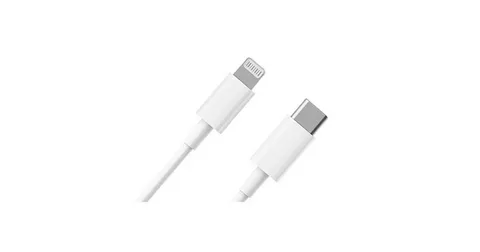
A USB-C to Lightning cable is Apple’s fast-charging and data transfer solution that connects iPhones, iPads, and other Lightning-enabled devices to modern USB-C chargers and computers. Compared to older USB-A to Lightning cables, it supports faster charging speeds with USB Power Delivery (PD) and quicker data transfer when paired with compatible devices. It’s widely used with Apple’s 20W and higher USB-C power adapters, enabling up to 50% charge in about 30 minutes for newer iPhones. However, since Lightning is being phased out in favor of USB-C, buyers should look for MFi-certified cables to ensure safety, compatibility, and durability. In short, this cable offers speed, convenience, and future-ready charging until Apple fully transitions to USB-C across all devices.
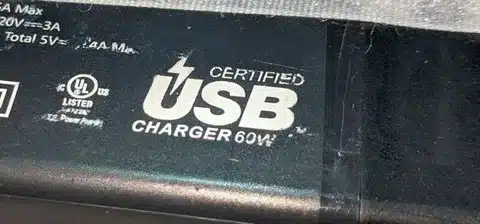
USB-IF certification is an official approval from the USB Implementers Forum that verifies a cable, charger, or device meets strict standards for safety, compatibility, and performance. Products with this certification have been tested to ensure they deliver the correct power, support proper data transfer speeds, and work reliably across different brands and devices. For consumers, choosing USB-IF certified accessories reduces the risks of overheating, slow charging, or device damage often caused by uncertified cables. In short, USB-IF certification is a mark of trust that guarantees your USB products are both safe and dependable.