
USB-C cables, including those like usb a, are not all manufactured equal. There are charge-only, data-only and charge-data, but how do you know which is which?
Selecting an incorrect USB cable may be frustrating: charge slowly, transfer of files is unsuccessful, or even a problem with compatibility of devices. The most important aspect in terms of compatibility, data security, data exchange, and maximum performance of devices is to understand the major differences between USB data cables and USB charging cables.
Need a high-quality USB-C data transfer cable that can transfer data or just a quick-to-charge device, this guide will assist you in making an informed choice and not to fall into the usual traps.
What Is USB-C? A Brief Overview
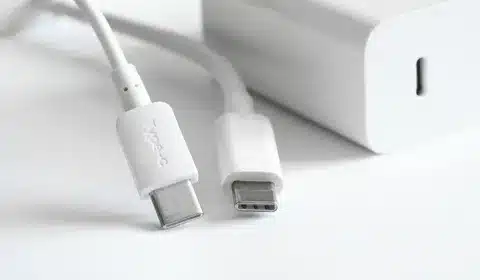
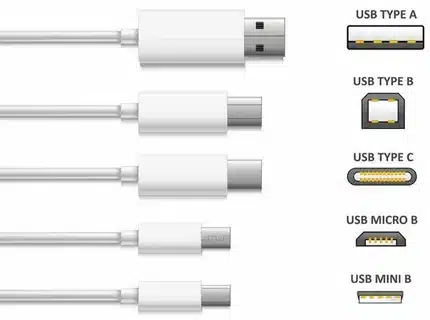
USB-C is a reversible connector with 24 pins that can be used in data transfer, deliver power, and video output within a compact device. In contrast to older USB connectors, usb c is reversible which means not to have to wade through the hoarding of cable without upside.
It is a universal connector that has become very popular in such types of devices as smartphones, laptops, tablets, and peripherals. USB-C has become the new universal standard of the modern times all the way to flagship Android phones and charging cable MacBooks.
The connector is versatile and capable of supporting many different types of protocols as well, such as data cables, USB 3.2, Thunderhead 4 and DisplayPort, meaning it can be used to do things as basic as charging devices all the way to large-scale data transfer and 4K video output.
Understanding USB-C Cable Types
Charging-Only Cables
Cables with charging only, also known as power only cables, are meant to deliver power only to your devices. These cables are specialized in the transfer of electrical power between a charger or power bank to the battery of your gadget.
Internal Structure: Internal wires of these cables are often fewer and they concentrate on the power lines (VBUS and ground) but exclude the data transmission wires. They are simpler to build which makes them cheaper to produce.
Use Cases: Ideal adapters to use on a wall, car charger, or power bank when you simply need to charge something. They are perfect when you need a dedicated charging solution that does not have the mass or price of a cable with full functionality, contrary to popular belief .
Limitations: The most significant one is that they cannot facilitate any type of data transfer. With these cables you can not sync files, transfer photos or any form of data connection between devices.
Data & Charging Cables (Dual-Purpose)
Cables and data Data Data and computer charging cables are all elements of the full USB-C experience, allowing both power delivery and data transfer at one time. These are the wires that realize the potential of the USB-C connector and denote data transfer capabilities .
Internal Structure: Data lines including differential pairs to carry data at high speeds have been included in these cables. The more complicated inner wires and wiring will enable devices to communicate with each other and still provide power.
Use Cases: Appropriate when synchronizing devices, transferring files, connecting to storage devices and monitors, and charging at the same time. The cables are critical in users who require flexibility in their connection services.
Specifications: Frequently have a higher data transfer rate (USB 3.0, 3.1 or 3.2) according to usb spec nd are capable of high power loads such as charging a laptop, up to 100W.
Key Differences at a Glance
| Feature | Charging-Only Cable | Data & Charging Cable |
| Data Transfer | ❌ No | ✅ Yes |
| Power Delivery | ✅ Yes | ✅ Yes |
| Cable Thickness | Thinner | Thicker |
| Cost | Lower | Higher |
| Use Case | Charging only | Charging & Data Sync |
How to Identify the Right Cable
Visual Inspection: Look for labels and markings on the cable itself. Cables which can carry data may be labeled in ways such as USB 2.0, USB 3.0, or USB 3.2. These are specifications that show the extent of data transfers over the cable.
Cable Thickness: Thicker cables are a possible sign of higher power capacity and added interior wiring to pass data. Although this physical attribute cannot be sufficient, it can at least offer some initial directions.
Manufacturer Information: See product specifications, packaging or user manuals. Respectful manufacturers have it well marked whether their cables can support data transfer, charging or both.
Testing Method: Testing is the most sure method of determining cable capabilities. Plug the cable between a computer and a device and verify whether the computer identifies the device to carry out file transfer processes.
Real-World Scenarios
Scenario 1: Charging-only cable with a laptop or phone can have slow charging or it can not charge at all particularly when the laptop needs more wattage supply but the cable cannot provide it.
Scenario 2: An effort to move big photo collections or valuable documents with the help of a charging-only cable will incur a connection failure or an unnotice by the devices, thus frustrating at a critical point.
Scenario 3: With a high-quality dual-purpose cable, you can not only charge your device and transfer data efficiently but also maintain flexibility so that you can charge a device and at the same time back-up files or transfer data.
Tips for Choosing the Right Cable
Match Specifications: It must be centered that the cable adheres to the necessary specifications required by your device in terms of USB and power delivery. Refer to specifications of cables suggested by the manual of your device.
Quality Matters: Avoid buying cheap cables and instead buy cables of a well-known company which follows the USB-IF standards. Good quality cables contain adequate shielding, good connectors, and internal wiring that will last long.
Avoid Counterfeits: Watch out against very cheap non-brands of cables which might not be up to standard. Inefficient power control can destroy devices or cause safety hazard due to poorly made cables.
Consider Future Needs: It would be better to use a good quality data and charging cable, like a micro usb cable, in case you are not sure of your needs. The extra expenditure gives the current connections and future connections of devices flexibility.
Conclusion
To achieve maximum device performance and eliminate connection frustrations, To achieve maximum device performance and eliminate connection frustrations, it is important to learn the distinction between USB data cables, marked with the usb logo, and USB charging cables. As nice as a charging-only cable solution is with its specific applications at a lower cost, a dual-purpose cable has the flexibility that most users require in the modern connected world.
Evaluate the particular needs and use of your device before deciding the type of cable to purchase next time. Investing in quality dual-purpose cables that accommodate both data transfer and power delivery, including options like those that fit a micro usb socket, is the best option to most users in order to achieve optimum compatibility and functionality in all scenarios.
FAQs
Q1: Can I use any USB-C cable for charging? A1: USB-C not all cables are capable of sufficient power delivery. It is important to test hat the cable is rated according to the charging needs of your device more so laptops which might require more wattage.
Q2: How can I tell if a cable supports data transfer? A2: Look on cable or package specifications to tell whether it is USB 3.0 or more. Such designations verify the data transfer features in addition to simple charging.
Q3: Are expensive cables always better? A3: Price usually goes in line with data building quality and adherence to safety rules but be sure to check specifications and read the reviews of people you can trust before buying usb device.
Q4: What’s the difference between USB 3.0 and USB 3.2 cables? A4: USB 3.2 cables have higher data transfer speeds (up to 20 Gbps) than USB 3.0 (5 Gbps), so they are more appropriate in large file transfers and high-resolution video usb port.
Q5: Can using the wrong cable damage my device? A5: Low quality cables or incompatible cables may cause damage to devices either by improper power delivery or result in electrical faults. Always prefer those cables that are certified by well known manufactures not all usb cables.