
USB cables are now the support of our digital life in the modern globalized world. As a basic example between charging smart phones and moving huge files across devices, these connectors seem simple but are a vital ingredient in ensuring our technology ecosystem is functioning well.
However, as ubiquitous as they are, most of the people who use them are left puzzled by the confusing number of products in the market when it comes to USB cables. The bad decision may include slower charge, unsuccessful data transfer, or incompatibility with your devices altogether.
This detailed reference works through the confusion to ensure you can comprehend, discover and choose the ideal USB cable in each case. Technology lovers or just common users will find all they require to make good choices about USB connection.
The Evolution of USB Technology
USB (Universal Serial Bus) has gone a long way since it was introduced in the 1990s. The use of it as a mere solution to the problem of cable clutter has been expanded to become a complex standard, capable of supporting the process as simple as data transfer to high-speed charging and video transmission.
Knowing the evolution can help in better understanding why there are so many varieties of USB nowadays. Each generation also introduced some new improvements in speed, power delivery and functionality with as much backward compatibility as possible.
USB 1.0 with its humble 1.5 Mbps and USB4 with its scorching 40 Gbps are one of the most successful standardization projects in terms of the sphere of technology. That advancement has been able to create advancements that we have since assumed to be part of our lives, such as immediate file sharing or charging up our devices quickly.
USB Type-A: The Classic Connector
Understanding USB-A Design and Function
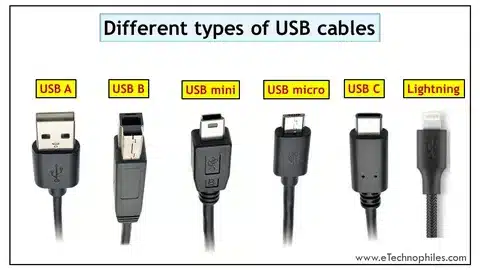
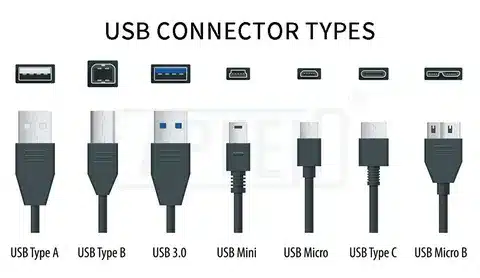
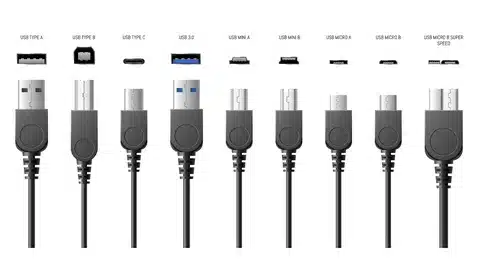
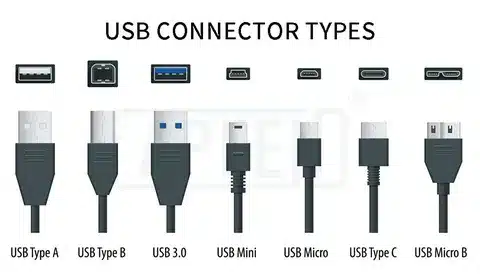
USB Type-A is the most familiar connector in the presence of USB. This flat connector has a rectangular shape and it comes in a very unique design that has not changed much over the 20 plus years, making it easily recognizable by consumers across the globe.
USB-A connector is about 12mm x 4.5mm, and has four internal pins through which information is transmitted and power is also delivered. Its sturdy construction and its stable connection system has seen it become the go-to product in host devices such as computers and charging adapters.
A distinctive feature of USB-A is that it is directional – it can never be inserted the other way. Although this stops damage caused by incorrect insertion, it has resulted in the dreaded USB flip effect where users have to attempt as many orientations as possible in order to achieve a successful connection.
Common Applications for USB-A Cables
USB-A connectors dominate the computing environment as the default output port on laptops, desktop computers and USB hubs. Almost all computers produced over the last 20 years have one or more USB-A ports used to connect peripherals and accessories.
USB-A charging ports are common in power banks, car chargers and wall adapters in the charging arena. Due to this universal usage, compatible charging solutions are available practically anywhere, and USB-A is a great option both to take with you and use every day.
USB-A is often used in gaming consoles, smart TVs and home entertainment systems to connect controllers, storage devices and media accessories. This sharing consistency across entertainment systems has fixed USB-A as a universal connect standard.
USB-A Compatibility Considerations
USB-A connectors are highly backward compatible and newer connectors can use older equipment and the opposite is also true. The reality is however based on the lowest common denominator among the cable, ports and connected devices.
When plugging USB-A cables to a device, attention should be paid both to the type of connector and to the version of USB. A USB 3.0 cable run into a USB 2.0 port will perform only to USB 2.0 speeds, no matter the ability of the cable.
USB-A power delivery is usually less than newer standards. Although it can supply enough power to most smartphones and small devices, USB-A can be unable to supply enough power to be used by laptops or other high-demand electronics unless special charging modes are used.
USB Type-B: The Printer’s Choice
USB-B Connector Characteristics
USB Type-B connectors are shaped in a unique square with slightly rounded corners and thus are very identifiable among other USB connectors. This design is much more durable and has a high security connection, so it is important especially to those that are not portable and need long-term connection.
The connector is about 12mm in diameter, and contains the same four-pin arrangement as USB-A. However, the increased size of its design enables it to have stronger internal parts and strain relief to avoid being worn out of frequent connections and disconnections.
USB-B connectors are directional in nature, but have an easier method of insertion compared to USB-A. The beveled corners and square shape give both visual and tactile indications of correct orientation to minimize connection errors and possible damage.
Typical USB-B Applications
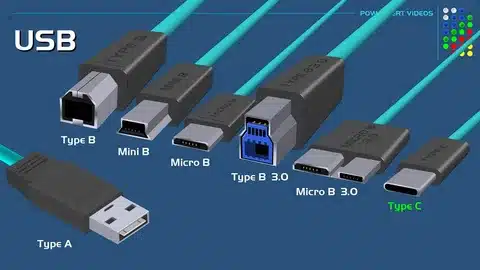
The most typical use of USB-B connectors is printers. Most desktop printers, multifunction printers and professional printing devices use USB-B ports to connect to computers, making it a de facto printing industry standard.
USB-B connectors are commonly used with external hard drives and storage enclosures, especially larger desktop devices. The highly connected reliability of the information transmission at the time of the long-term back-up operations and file transfer, when the stability of the connection is the main problem.
USB-B ports are found in audio equipment, such as digital audio interfaces, MIDI controllers and professional recording equipment. This decision is an indication of the audio industry towards having safe noise resistant interconnections that cannot disrupt important recording or performance sessions.
USB-B Compatibility and Limitations
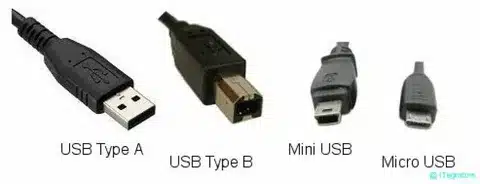
USB-B cables are normally marketed as USB-A to USB-B cables, whereby the USB-A end is connected to the computers or hubs and the USB-B end connected to the peripheral devices. This topology is a master-slave connection that is typical of USB connections.
USB-B is used in desktop systems and stationary devices and is not used in portable devices due to the bigger size of the connector. This limitation has made USB-B not to achieve success in the mobile gadgets market.
Power delivery is to the same extent as USB-A, and high power applications are limited in the same way. Nonetheless, the stable connection and the high-strength design makes USB-B perfect with those devices, which are not concerned with portability and more concerned with reliability.
Mini-USB: Compact Connectivity
Mini-USB Design Evolution
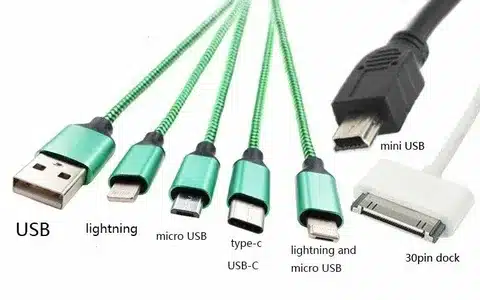
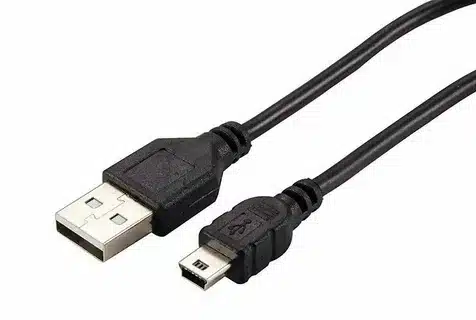
The first attempt at the miniaturization of USB connectivity in portable devices became the appearance of mini-USB connectors. There were a number of variations defined by the standard, yet the most popular became the Mini-B because it offered a combination of size, durability and usability.
The connector of the Mini-USB is roughly 7mm x 3mm in size, a considerable decrease in size compared to standard USB connectors. Although this is a small form factor, it retains the requisite four-pin layout required by the transfer of data and delivering power.
The connector will have trapezoidal form with flat base and slanting top so that it gives good direction to the connector and a way to ensure connection. It was especially an apt design in early Smartphone, digital camera, and portable media players.
Historical Significance of Mini-USB
Mini-USB became rampant in the early 2000s when smart phones and portable devices began to spread. Large manufacturers such as HTC, Samsung and BlackBerry made Mini-USB the standard in their products, but this led to a momentary charge cable standardization.
Mini-USB became the standard in digital cameras in order to transfer photographs and charge the battery. So widespread was this adoption that the connection between Mini-USB and camera connection is still common in many photographers even though the industry has long since shifted to different standards.
Mini-USB ports were common in portable gaming devices, MP3 players and in early tablets. The connector was sufficiently powerful and sufficiently small to be used in these applications where space was limited but functionality could not be compromised.
Mini-USB Modern Applications
Mini-USB has lost much use, but still applies in certain niches, whereas Micro-USB and USB-C have largely replaced it in consumer devices. Scores of professional audio and video equipment makers still use it in Mini-USB because of its long history of reliability and ubiquitous cables.
Mini-USB connections are common in GPS, dash cameras and automotive accessories. The connector is durable and can endure vibration so it is a good choice in mobile applications where connection integrity is an issue.
I long product life cycles and certification requirements have kept some industrial and medical devices that are Mini-USB compatible. In these applications, the proven track record of Mini-USB outweighs the advantages of newer connector types.
Micro-USB: The Mobile Standard
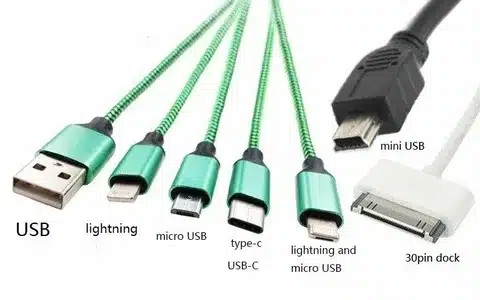
Micro-USB Technical Specifications
Micro-USB is an additional miniaturization of USB with mobile devices in mind with space being very limited. The connector is only 6.85mm by 1.8mm and much smaller than the past USB standards.
Even though it is small, Micro-USB is a full USB capable of data communication and power supply. The connector is five-pinned (instead of four pins in larger USB types) to allow other features such as USB On-The-Go (OTG) capability.
The connector has a unique flat, rectangular design making the top part a bit wider. This asymmetry design ensures an obvious direction on where to go and still have the secure contact required in mobile usage.
Micro-USB Dominance Era
The 2010s saw micro-USB attain such dominance in the mobile device market as never seen before. Micro-USB became the de facto smartphone charging port standard at most manufacturers following the adoption mandate of the European Union on standard charger ports.
During this time, the Android smartphones nearly universally had Micro-USB, and this formed an environment where users could share chargers and cables amongst devices of different brands. This was a marked advance on connector anarchy among proprietary connectors of previous smartphone generations.
Micro-USB connectivity became adopted in tablets, e-readers, Bluetooth speakers, and dozens of other portable devices. There was little room to be confused about which type of portable electronics to use; Micro-USB, with its small size, good performance and universal availability, was probably the answer.
Micro-USB Performance Characteristics
Micro-USB data transfer rates are often USB 2.0, with a maximum of 480 Mbps transfer data. Although adequate in most mobile apps, this rate constraint became evident as files continued to grow in size and as the expectations of the users exceeded.
Micro-USB power delivery Power delivery by Micro-USB is typically restricted to 2.5 watts (5V at 500mA) according to typical USB specifications. Nevertheless, numerous manufacturers adopted proprietary charging protocols to enhance the delivery of power to reduce the duration of charging.
The connector is small, which is advantageous in terms of the design of devices, but causes issues in the durability. The fragile pins and thin metal housing are prone to wear with repeated insertion cycles and physical stress that may cause connection problems in their lifetime.
Micro-USB in Today’s Market
Micro-USB is still used in low-end smartphones and accessories, and older devices, although most of this usage has been supplanted in high-end devices by USB-C. Manufacturers in price sensitive markets will find it appealing due to its low cost and the long-standing supply chain.
Most wireless accessories such as Bluetooth headphones, fitness trackers and smart watches still use Micro-USB to charge. It is a convenient option since the connector is small and can be recognized in any country (universal).
Micro-USB devices have replacement parts, repair services and aftermarket accessories that are still common. This ecosystem support increases the useful life of Micro-USB products and keeps them relevant in a given market segment.
USB Type-C: The Future Standard
Revolutionary USB-C Design
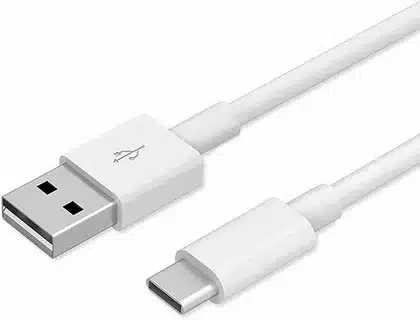
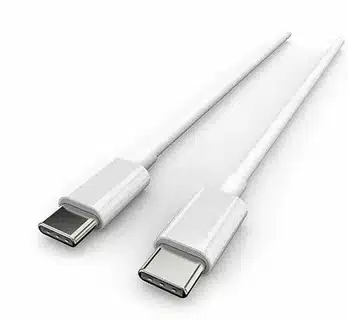
USB Type-C is the most important innovation in USB connector technology since the start of the standard. The connector is oval with dimensions of 8.4mm by 2.6mm and it is the perfect proportion between a compact connector and a powerful functionality.
USB-C is revolutionary in that it is a reversible device – you can plug it in one way or the other and still not break it or disconnection. This apparently minor advantage removes frustrations of using directional connectors, and is a significant enhancement to the user experience.
USB-C connectors have 24 pins as opposed to four or five pins of older USB standards. This dramatic growth in the count of pins allows enhanced capabilities such as alternate modes of video output, greater delivery of power, and real time transmission of data in both directions.
USB-C Versatility and Capabilities
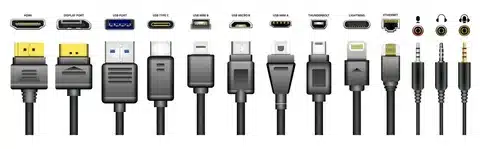
The alternate mode capability of USB-C enables it to transmit non-USB signals such as DisplayPort, HDMI and thunderbird. Such functionality implies that one USB-C port can support video output, data transfer, and power delivery at a time, meaning that there is no necessity to have many specialized ports.
USB-C power delivery may be up to 100 watts (20V at 5A) based on the USB Power Delivery specification. Such a feature makes USB-C not only capable of charging smartphones and tablets, but also laptops and other high-power devices that would have used proprietary charging solutions before.
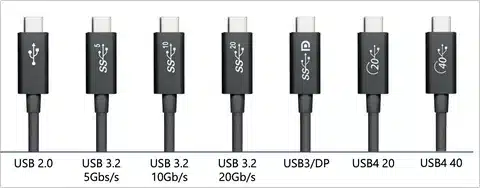
Depending on the cable and devices connected, connector supports USB data transfer between USB 2.0 (480 Mbps) and USB4 (40 Gbps). This scalability guarantees that USB-C is applicable to a broad set of uses and performance requirements.
USB-C Market Adoption
USB-C has become a standard charging and data port being used by smart phone manufacturers. USB-C has replaced the type in the Pixel family, Galaxy products, and most Android companies; Apple introduced it to the iPhone with the iPhone 15 generation.
USB-C has been adopted by laptop manufacturers because it supports power delivery, data transfer as well as video output with only a single port. The connector is versatile, and future oriented in many ways there are several modern laptops with USB-C as a primary or sole connector.
USB-C is an increasingly common connection in gaming consoles, professional audio devices and high-end accessories. The connector has high-speed data capabilities, and efficient power delivery, which is perfect in demanding applications that challenge or exceed USB performance.
USB-C Advantages Over Previous Standards
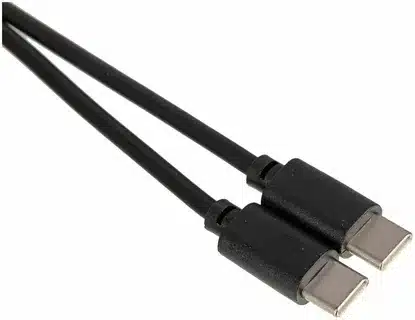
The reversible design removes the chance of inserting errors and decreases wear on cables and device ports. This alone is a great leap towards improving user experience and improving the operational life of cables as well as devices.
Increased power delivery capability will result in reduced charging time and the charging of larger devices. The same cable can now be used to charge smartphones, tablets, and even laptop, making the process of managing the devices less complex and cluttering cables.
Future-proof design will keep the USB-C current with the changes in technology. The connector has a large number of pins and flexible specification so that the connector can be reconfigured to new requirements without physically changing the connector.
USB 1.0 and 1.1: The Foundation
Early USB Development
USB 1.0 was introduced in 1996 and set the basic principles which are still used to develop USB. The specification brought the idea of a universal connector that can substitute the numerous proprietary interfaces of the time.
USB 1.0 originally had two speed options, Low Speed (1.5 Mbps) to use with simple input devices, such as keyboards and mice, and Full Speed (12 Mbps) to use with higher needs, such as early digital cameras and storage devices.
In 1998, the initial specification was improved into USB 1.1, which was the first popular USB standard. The changes involved reliability and compatibility as well as the solution of early deployment problems that had constrained acceptance of USB 1.0 in the market.
USB 1.x Performance Characteristics
USB 1.1 data transfer rates were high enough to meet the computing demands of the late 1990s, when an average file was considerably smaller and storage capacities were very limited. The maximum speed of 12 Mbps would move the amount of a typical 3.5-inch floppy disk in approximately two seconds.
USB 1.x could deliver power only to a maximum of 2.5 watts (5V at 500mA), enough to power simple peripherals but not enough to power a high power device. Such a restriction required most USB devices at this period to use external power equipment.
The plug and play capability under USB 1.x was a breakthrough compared to the past connection standards. Peripherals could be added and removed without powering off the computer making it much easier to manage the devices.
Legacy of Early USB Standards
USB 1.x defined the connector types and simple protocols that are applicable till to date. Physical USB-A and USB-B connectors that were introduced by these early standards are in wide use and show the prescient nature of the original USB specification.
A lot of simple peripherals such as keyboards, mice and simple storage devices work completely under USB 1.1 standards. Such backward compatibility means that the older devices will be compatible with the modern computers, which also prolongs their operating time.
USB 1. x was a success in making computer connections simpler which formed the foundation of any other USB product. The universal connectivity, plug-and-play and standardized power delivery developed with these early versions remain the guiding principles of USB development.
USB 2.0: Mainstream Adoption
USB 2.0 Speed Revolution
USB 2.0 S. which was developed in 2000, provided a dramatic 40 times faster speed over the older model with a maximum data transfer rate of 480 Mbps (60 MB/s). This enhanced USB to be useful in applications that are unattainable with the previous versions such as high-capacity storage and digital video transfer.
The Hi-Speed USB naming was designed to distinguish USB 2.0 devices in the market, although the theoretical maximum transfer rates can in practice be well below actual transfer rates, owing to protocol overhead and practical situations. The common prolonged transfer rates were 20-40 MB/s (according to the devices and applications in question).
USB 2.0 was also completely backward compatible with USB 1.x devices so that peripherals that were already available still worked with new USB 2.0 ports. This interoperability made the shift easy and promoted quick uptake by the manufacturers and consumers.
USB 2.0 Market Impact
USB 2.0 improved the speed capabilities of the product which also made it possible to have completely new product categories such as external hard drives, the digital video cameras, and high-resolution scanners. Such applications were not feasible with USB 1.x but they became mainstream with the better performance of USB 2.0.
USB 2.0 was adopted by digital cameras and early smart phones to transfer photos and to synchronize devices. The faster speeds offered an opportunity to transfer large image files and later video content, with which the development of digital photography and the development of early multimedia devices are supported.
USB 2.0 adoption changed the storage devices. USB flash disks made it feasible to exchange large files and external hard drives offered a feasible substitute to internal drive development to both clients and organizations.
USB 2.0 Enduring Relevance
USB 2.0 is still sufficient in most contemporary applications, in spite of its advanced age of more than 20 years. Simple peripherals such as keyboards and mice and simple audio devices can work flawlessly with USB 2.0 speeds, which is cost-effective to many manufacturers.
A lot of low-cost devices and accessories still operate with USB 2.0 in order to minimize the expenses and offer sufficient functionality. This strategy keeps these products affordable to the consumers of price-sensitive products but satisfies their fundamental needs of connectivity.
USB 2.0 is useful to the industrial, medical and embedded fields where newer standards are not required or suitable, because of legacy system compatibility. These special use cases are well supported by the mature specification and broad availability of components.
USB 3.0: The Speed Leap
USB 3.0 Technical Breakthrough
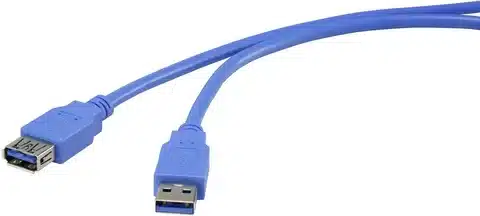
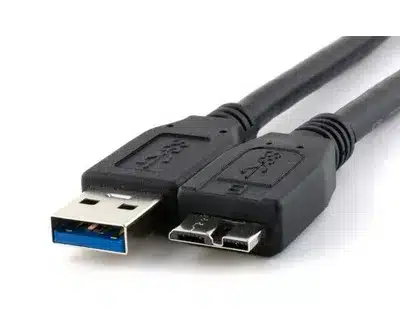
In 2008, USB 3.0 (which was eventually renamed USB 3.1 Gen 1) provided an increase in speed, a factor of ten over USB 2.0, with up to 5 Gbps (625 MB/s) of transfer speed. This radical increase was realised with extra data lines and more advanced signalling methods.
The SuperSpeed name was used to differentiate between USB 3.0 and earlier generations, but the name grew more convoluted with each revision added afterwards. USB 3.0 port blue color coding enabled a visual identification to allow users to optimize performance.
Backward compatibility was also a priority and all older USB connector types are accepted by USB 3.0 ports. But to obtain high speed, the port and cable must be capable of supporting USB 3.0 specifications, which requires upgraded cable infrastructure.
USB 3.0 Performance Benefits
USB 3.0 real-world transfer rates in practice were generally 100-200 MB/s, a further significant increase over the real-world performance of USB 2.0. This speed growth caused external storage devices to be competitive with internal drives on many applications.
USB 3.0 delivered more power (4.5 watts (5V at 900mA)) and made more capable devices powered by the bus possible. This enhanced the fact that many peripherals did not need external power adapters to be set up, and also minimized cable clutter.
Increased bandwidth supported new applications such as external graphics adapters, multi-stream audio interfaces and high-resolution webcams. These functions have increased the role of USB beyond mere data transfer to embrace multi-media applications that are demands.
USB 3.0 Market Transformation
The USB 3.0 brought back a revival in external storage. The high density of flash drives and portable hard drives became feasible in the professional world such as video editing where large file transfer was a common need.
USB 3.0 was adopted into professional audio and video gear because of its capability to support various high-quality data streams at the same time. Such capability allowed USB to share specialized interfaces such as FireWire in professional multimedia applications.
USB 3.0 was advantageous in gaming peripherals and other gaming accessories by reducing latency and expanding bandwidth. Gaming keyboards, mice and controllers that are high-end could have more advanced functionalities and at the same time remain responsive in performance.
USB 3.1 and 3.2: Enhanced Performance
USB 3.1 Generation Evolution
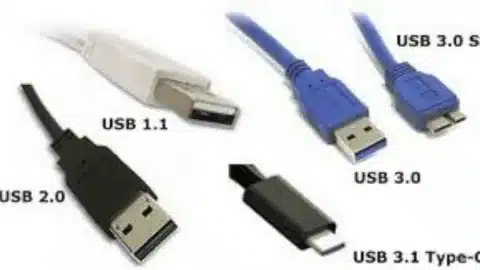
USB 3.1 also came up with a confusing naming system of generations where Gen 1 (5 Gbps) was more or less the same as USB 3.0, whereas Gen 2 actually brought performance gains with 10 Gbps transfer speeds. This twofold increased speed, and new high-performance applications became possible.
USB 3.1 Gen 2 added an improved encoding scheme which enhanced efficiency and lessened protocol overhead than its predecessors. These advances saw that the practical transfer speeds approached theoretical maximums, and offered superior performance in practice.
USB-C connector integration became closely linked with USB 3.1, but the connector and protocol are not connected. This association assisted in catalyzing the use of USB-C and giving a current physical connection to the new functions.
USB 3.2 Specification Expansion
USB 3.2 also made the naming system more complex with the introduction of several generations (Gen 1, Gen 2 and Gen 2×2) but of varied speed capabilities. The Gen 2×2 variant returned 20 Gbps by using both arrays of interface data lines in USB-C cables, effectively doubling bandwidth.
USB-C implementation received a lot of attention in the specification as the industry abandoned older connector types. Such conformance eased cable management but offered a future-proof platform on which further development can be perched.
USB 3.2 multi-lane operation mandated a specified cable construction and device support, and offered a hierarchy of performance levels based on the precise components involved. This was a complexity that posed a problem on the part of manufacturers and consumers to comprehend the compatibility requirements.
Performance Applications
Performance High-end external storage devices started to approach internal drive performance with the implementation of USB 3.1 and 3.2. External storage became open to professional users who could now rely on external storage without incurring any serious performance costs.
The improved bandwidth greatly aided video content creation where 4K and even 8K video content could be edited in real time based on external storage. The ability has changed the workflow of mobile video editing and provided a more adaptable production configuration.
The higher bandwidth was used to support several high-resolution screens, high-speed storage and other peripherals via just one USB-C connection using advanced docking stations and hubs. The simplification in this consolidation increased the ease of connection of laptops without compromising functionality.
USB4: The Cutting Edge
USB4 Revolutionary Approach
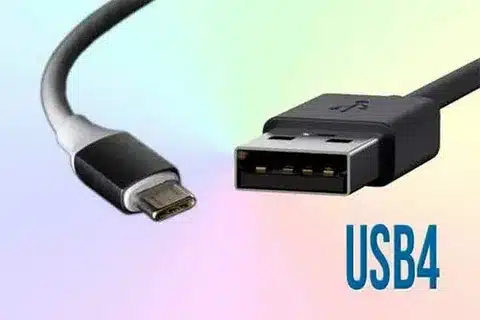
USB4 is a paradigm shift in the philosophy of USB design that integrates the technology of Thunderbird 3 to provide unmatched performance and capability. The specification requires 20 Gbps minimum speeds with optional 40 Gbps performance, corresponding to the performance of high quality Thunderhead implementations.
The dynamic bandwidth configuration in the protocol is intelligent in its allocation of available throughput to various connected devices and applications. This intelligent distribution is designed to provide maximum functionality of video, data and power delivery all with one connection.
USB4 uses USB-C only, and is considered a final break with legacy connector formats. Such a choice streamlines the specification and guarantees that any impluer of USB4 would support the complete set of features such as alternate modes and high power delivery.
USB4 Advanced Features
Tunneling permits USB4 to be used to transmit DisplayPort and PCIe and legacy USB traffic at the same time on the same connection. Such a multiplexing feature allows advanced docking features, which may have different displays, fast storage and standard USB devices on a single port.
USB4 is capable of delivering power up to 240 watts when the newest USB PD 3.1 specification is used, allowing the connection and charging of high-performance workstations and laptops. This feature reduces the use of special power adapters in most professional applications.
Backward compatibility Backward compatibility means that USB4 ports are compatible with all older USB devices, but limited in performance by the performance of the older device. This interoperability facilitates the process and safeguards the current hardware investments.
USB4 Market Implications
USB4 is finding most use in professional workstations and high-end laptops, where its capabilities are used to develop genuinely universal docking solutions. One USB4 connection can supply power, multiple display connections and fast peripheral connections.
The advantages of USB4 to content creating professionals is that they can support several 4K screens at the same time as they are able to move large video files and feed laptop power. This feature has revolutionized the mobile professional workflows as several cables and adapters are not needed.
This incorporation of Thunderbird capability in the technology makes high quality connections available to a wider market, and eventually with time and since the cost of implementing the technology is reduced.
Compatibility: Matching Devices and Cables
Understanding Device Port Requirements
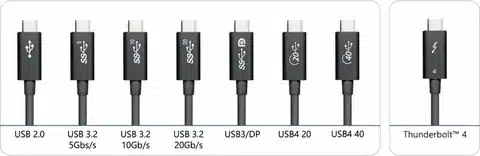
Contemporary devices have different types of USB ports that have different sets of capabilities and restrictions. The first step in picking the right cables and ensuring maximum performance of your particular applications is to determine the type of port in your device.
Depending on the manufacturer and model generation, Smartphones have either Micro-USB, USB-C or Lightning ports. Physical inspection or checking of the specifications of your device will show the proper connector type required when charging and transferring data.
Computers can have many types of USB ports such as USB-A, USB-C, and customised ones. Knowing which ports are compatible with what USB versions and power delivery capabilities can be used can maximize device connections and charging performance.
Cable and Port Compatibility Matrix
USB-A to USB-C cables enable connection between modern devices and traditional computer ports. These cables play a crucial role in the case of users who switch to USB-C devices and still be able to use them with present computer infrastructure.
USB-C to USB-C cables are the best in performance where both the devices have advanced USB versions and power delivery. Cable quality and specification compliance, however, have a significant effect on actual performance, and in this regard careful choice is of importance.
Legacy connections with Mini-USB or Micro-USB need specialised cables, which can become rare in an industry moving to USB-C. Retaining compatibility with older devices may be necessary to keep legacy cables, or may need adapters.
Cross-Platform Considerations
Apple products pose special compatibility issues with the Lightning connectors on iPhones and iPads, but recent devices have switched to USB-C. Knowledge of the Apple connector policy can be used to plan cable requirements in mixed-platform systems.
USB-C has become the almost-universal connection used by Android devices, with low-end devices still using Micro-USB. Such a variety in the Android ecosystem necessitates attention to certain requirements of devices in purchasing cables.
There are several connector types to gaming consoles and accessories, depending on the device generation and the manufacturer. To be sure of compatibility, it is necessary to check specifications of certain gaming peripherals and accessories..
Data Transfer Speed Requirements
Assessing Your Speed Needs
The needs of file transfers differ radically, depending on the patterns of usage and the type of files. Simple document transfer does not consume much bandwidth and video editing, photo taking, and backup processes cannot be performed without fast connections to make the workflow things work.
USB 3.0 or faster speeds are very useful when performing large file transfers such as video content, software installations and system backups. Transfer time calculation on a practical file size helps to know whether speed upgrades would be of practical use.
Streaming applications such as live video streaming, audio recording and gaming can need not only high bandwidth, but also low-latency links. These specifications prefer new USB specifications and quality cable implementations.
Speed Hierarchy and Practical Performance
USB 2.0 has a theoretical bandwidth of 480 Mbps which is about 20-40 MB/s in practice, which is enough to transfer basic files but not large media files. It is important to know this difference between theoretical and practical speeds in order to be realistic.
USB 3.0 and later offers significant practical benefits, and actual speeds of 100-500 MB/s are common with unloading and loading devices and with the quality of the cable. With such speeds, external storage is competitive to internal drives on many applications.
USB speeds are well compared against network transfer speeds. Gigabit Ethernet offers 125 MB/s theoretically and USB 3.0 can be much faster, and therefore USB storage can compete with network-attached solutions.
Optimizing Transfer Performance
The quality of cables can strongly influence the real transfer rates, and cheap or long cables usually do not reach the declared speed levels. Real-world performance and reliability is often better when good cables are bought at a responsible manufacturer.
The capabilities of the devices cause bottlenecks that can affect the performance of the entire system irrespective of the cable specifications. It is important to make sure that every component of the chain of transfer supports the preferred speeds in order to avoid disappointment and investment losses.
The transfer speeds may be affected by file system and software considerations regardless of USB capability. Optimal performance of hardware investments can be achieved by using the proper file system and optimized software.
Charging and Power Requirements
Understanding Power Delivery Standards
USB Power Delivery (PD) is the most developed power standard, which can transfer up to 240 watts of power using USB-C cables. This facility can handle all smartphones up to the high-performance laptops as a consolidated power delivery across the devices.
USB delivers 2.5 watts (USB 2.0) to 4.5 watts (USB 3.0) by standard specification in traditional USB power delivery. Though these levels are suitable in simple devices, they cannot support tablets, laptops, and other power-intensive devices.
Manufacturer-specific proprietary charging protocols such as Qualcomm (Quick Charge), Samsung (Adaptive Fast Charge) and others can have higher than standard USB power delivery. These however need compatible devices and chargers to attain a better performance.
Device Power Requirements
The average 5-18 watts charge is necessary to charge the smartphone, although, newer devices have increased watts to quick-charge. The knowledge of power needs of your device will assist in choosing the best chargers and cables to use.
Tablet batteries are larger and consume more power and thus require around 10-30 watts to charge efficiently. While the result of using underpowered chargers can be slow charging or even the inability to charge during use.
Depending on the level of its performance and other features, Laptops might need 45-100 watts or more. Most laptops can be powered with USB-C, which only includes Power Delivery, and cable and charger choice can be essential with these models.
Charging Safety and Efficiency
The quality of cables directly affects the safety and efficiency of charging because inadequate quality cables may lead to damage of equipment, or cause fire hazards. Certified cables of leading manufacturers offer inbuilt safety and quality performance.
Charging systems require overcurrent protection, temperature monitoring and voltage regulation as important safety features. Chargers and cables that are good use these guards, whereas low-quality options can omit essential safety features.
The charging efficiency influences the speed and the heat generation of the charging process. Quality cables reduce resistance and power losses thus leading to quicker charging and lower heat generation.
Cable Quality and Durability Factors
Construction Material Impact
The material used in cable jacks can greatly influence life and quality with simple PVC cables jack, and the high-end braided materials. Jackets of higher quality are less prone to wear, crack, and damage under the influence of the environmental factors, as well as can offer more protection to internal conductors.
The quality of conductors defines the long-term reliability and electrical performance. High quality cables are made with high purity copper conductors and correct gauge size according to the intended applications of the cables to ensure performance is consistent throughout the life of the cable.
There is a wide range in connector construction between low-cost and high-quality cables, with the latter having reinforced strain relief, gold-plated contacts, and tighter molding. These are better in durability and also in electrical performance.
Stress Points and Failure Modes
The connector joints are the most frequent failure point in USB cables, and repeated bending and stress concentration may result in conductor breakage. Quality cables have a stronger strain relief, and connector attachment to reduce this risk.
Flexibility of the cable has implications on both usability and life cycle, where too rigid cables are hard to route and too flexible cables can lack sufficient conductor protection. Optimal designs balance flexibility with protection for long-term reliability.
Cable materials can be damaged due to environmental influences such as extreme temperatures, moisture and exposure to UV. Environmentally hostile cables use special materials and build technology to achieve long durability.
Quality Indicators and Certifications
USB-IF (USB Implementers Forum) certification: USB-IF certification is used to guarantee that cables are certified to official USB specifications and performance requirements. Certified cables have the USB logo and give a guarantee of compatibility and safety.
Testing and certifications by third parties, such as UL (Underwriters Laboratories), also offer extra safety, especially when dealing with cables which deliver large amounts of power. These qualifications are electrical and fire resistance.
The reputation of the manufacturer and the conditions of warranty may be taken as a sign of the quality of cable and expected performance. Well-established manufacturers who offer good products and offer a full warranty are likely to be better than unknown brands.
Device Compatibility Assessment
Port Identification Strategies
Physical inspection is the surest way of determining the type of USB ports, but connectors of similar appearance can differ in capability. Taking dimensions of ports and comparing with the standard specifications will facilitate proper identification.
There is final information available concerning port capabilities in device documentation and specifications such as supported USB versions, power delivery, and alternate mode. Referencing formal specifications will avoid compatibility problems and performance drawbacks.
USB port capabilities and connected device information may be determined with the help of software tools and operating system data. Performance bottlenecks can be determined by these tools and ensure the connections are running with the anticipated speeds and power levels.
Legacy Device Considerations
More recent standards have also replaced some cable types or adapters that some older equipment needs. Legacy device support can have to be planned by maintaining older cable inventory or by investing in quality adapters.
USB devices can be compatible with the physical connection, but incompatible with driver or software, or the opposite. This is to assure that older devices are supported by an operating system to avoid functional restrictions despite being physically connected.
The performance expectations must be changed in the case of legacy devices which might not be capable of supporting the modern USB speed or power delivery options. Knowledge of these constraints can be used to build sensible expectations and to prevent frustration with older equipment.
Future-Proofing Strategies
The most long-term compatible investment is USB-C cables and adapters since the industry keeps moving to this standard. USB-C has the highest future-proof connector capabilities and versatility.
Keeping the choice of cable types allows aligning with a wide range of different device ecosystems during the transition phase. A strategic cable inventory would be able to cater to the current requirements and future requirements.
It is useful to track trends in the industry, and announcements by manufacturers to be able to predict future connection needs. Keeping up to date with the future device releases and regular updates in the standards permits the active planning of the requirements in connection.
Data Transfer Speed Selection
Application-Specific Requirements
Video editing requires high speed connections as creative professionals need to work with a variety of video files, 4K and 8K video files are dozens of gigabytes in size, making USB 3.0 or above a viable option in order to conduct editing and backing up operations.
The productivity programs that are run in the office usually have smaller files in which USB 2.0 is sufficient. It is rare that documents, spreadsheets and presentations come anywhere near the threshold where the speed of transfer becomes an issue on a daily basis.
Gaming applications can demand fast connections to install initial games and update the games, and these can be above 100 GB in modern games. Nevertheless, the performance of real-time gaming requires more latency than throughput in most applications.
Calculating Transfer Time Requirements
Size of files is the direct factor that determines the time of transfer where there are easy calculations to know on whether the transfer speed is beneficial through upgrading. USB 2.0 will transfer a 10 GB file in about 8 minutes compared to 1-2 minutes using USB 3.0.
What impacts the value proposition of faster connections is frequency of transfers. Speed upgrades are of great significance to users who do large file transfers on a daily basis and not much to occasional users just willing to use basic speeds.
Transfer time is regarded as a component of workflow productivity. Even small increases in speed can offer a large workflow by transferring data often or as part of time-sensitive processes.
Balancing Speed and Cost
Performance scaling usually takes diminishing returns with the change between USB 2.0 and USB 3.0 offering impressive scaling, but the change between USB 3.0 and USB 3.1 offers smaller scaling. Knowledge of this scaling will assist to maximize investment.
The cable pricing between USB variants is usually only significantly different, and it is reasonable to adopt faster cables even when maximum performance is not needed by current applications. It is a method that offers future proofing with minimum cost.
The potential advantage of high-speed cables might not be achieved due to device incompatibility where the devices connected are not high USB versions. Evaluation of the whole chain of connection prevents excessive specification and loss of investment.